

Monitoring
Everything at a glance, for every site
Is the extraction running? How clean is the air? Which unit needs service? KEMPER Connect answers these questions on one overview page per site, in the asset list, and on the dashboard of every single device. Also for several plants in one account.
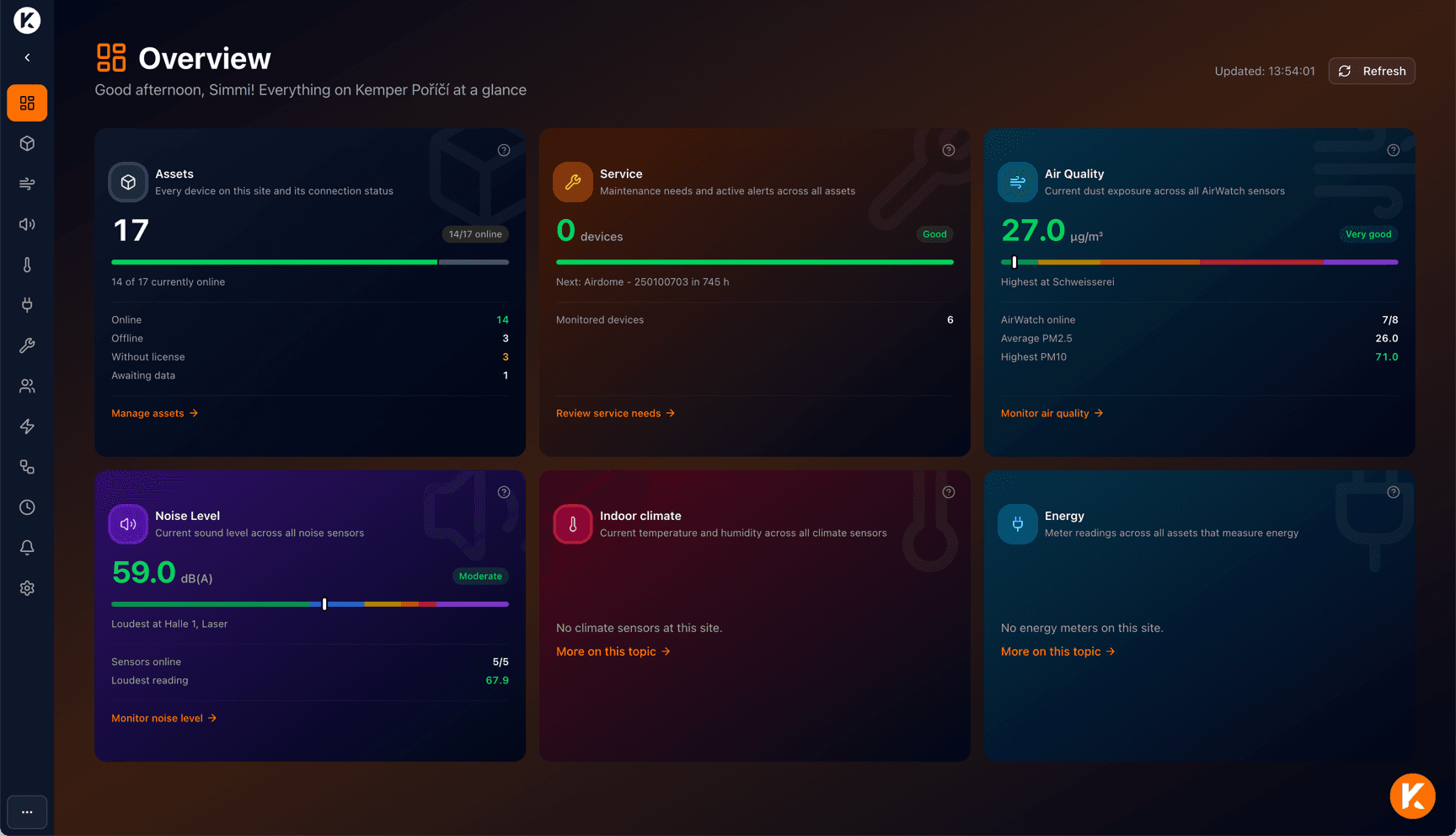
Site overview
Is everything in my plant in order right now?
One page, six tiles: Devices, Service, Air quality, Noise level, Indoor climate, and Energy. Each tile shows the current key figure, a status pill, a mini scale, and a direct link to the detail page.
Large sites load step by step: the first numbers appear within seconds, and a progress bar shows the state. Each tile has a question mark that opens the documentation with matching starter questions, for example “What do the values PM10 and PM2.5 mean?”.
- Devices: Number of devices, online and offline, awaiting data.
- Service: Devices with maintenance needs, active errors and warnings, next service due (“Next: AirDome Hall 2 in 120 h”).
- Air quality, noise level, indoor climate: Site average with rating level, highest value, and where it was measured.
- Energy: Sum of the meter readings, number of meters, largest consumer.
Asset list
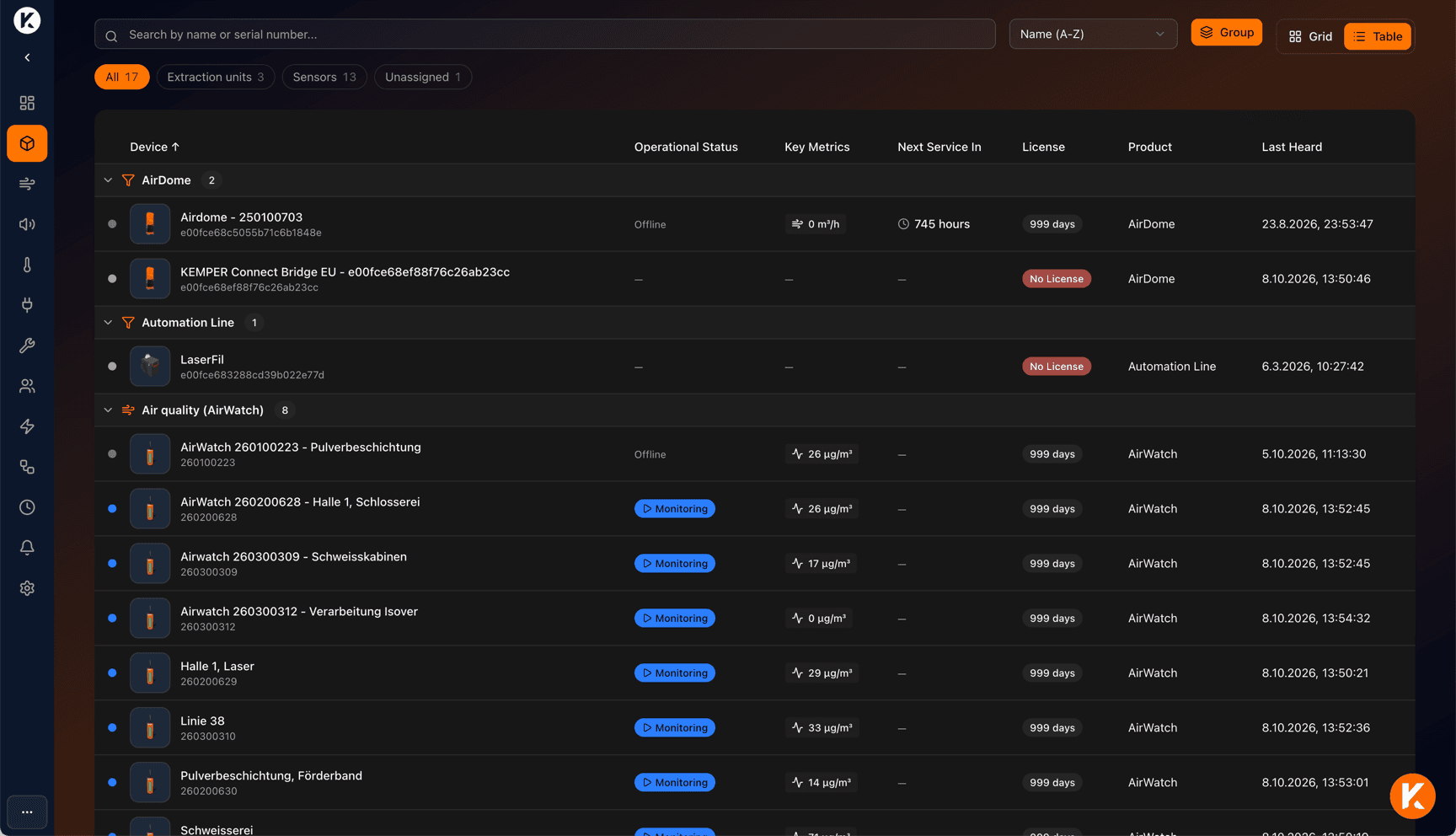
Every machine, every sensor, one status
KEMPER Connect detects the device type automatically and shows the matching dashboard. The asset list groups by type, such as AirDome, CleanAirTower, AirWatch, or climate sensors, and can be filtered by extraction units or sensors, searched, and sorted.
For each device you see connection status, operating state, current key figure, and the next service date. A custom photo and a location description such as “Building A, floor 2, production line 3” help you find devices quickly in large halls.
Device dashboards
Every device has five areas
Dashboards refresh automatically every five minutes, and on demand at the push of a button.
Dashboard
Live state, key figures, 24-hour history, errors, and maintenance notices.
History
Historical analysis over day, week, month (freely selectable depending on the device), statistics, comparison with the previous period, export.
Functions
Remote control, for example starting and stopping, with a safety prompt and feedback.
Status
State of the connection and activation of the device at a glance.
Settings
Name, location description, custom photo, device-specific settings, and operating information.
Errors in plain language
Not “Error 12”, but what to do
For filter units with native connection or KEMPER Connect Bridge, KEMPER Connect decodes the machine’s error and warning registers into plain language with cause, impact, and recommended action. Errors appear in red, warnings in yellow: on the device dashboard, in the asset list, on the service page, and in the service report.
Many warnings are early stages of an error, such as the motor temperature warning before the motor temperature error. That leaves time to react. Support can be contacted directly from any error message.
Site-wide analyses
One topic, all devices
The site pages combine all devices on a site under one topic. Each page has a ranking of the most conspicuous devices with a direct link, refreshes every five minutes, and explains the reference values used.
Air Quality
Particulate matter as a traffic light in five levels, ranking of polluted areas, history with working hours filter, PDF report.
Noise
Noise exposure by area and shift, action values 80 and 85 dB(A), exceedance analysis, PDF report.
Indoor Climate
Temperature and humidity according to ASR A3.5, mold risk estimate per room.
Energy
Daily consumption, share per device, history, and comparison of consumers.
Service and Maintenance
Service countdown, error and warning codes in plain language, service report to the service partner.
Reports and exports
PDF reports, service CSV, and measurement data export at a glance.
Monitoring kits
Measure noise and indoor climate, no setup required
For noise and indoor climate there are monitoring kits with a KEMPER Connect Gateway and five sensors per measurement. Place the gateway, add the sensors, and the readings appear on the site pages.
Noise Monitoring Kit
Document noise exposure by area and shift.
Included in the kit
- 1 ×KEMPER Connect Gateway with power supply
- 5 ×KEMPER Connect Noise Sensor with batteries
- Cellular data for the gateway
What KEMPER Connect shows
- Equivalent continuous sound level LAeq in six steps, rated against 80 and 85 dB(A)
- Exceedance analysis, working hours filter, PDF report, and export
- Levels only, no audio recording
Climate Monitoring Kit
Document indoor climate according to ASR A3.5 and detect mold risks early.
Included in the kit
- 1 ×KEMPER Connect Gateway with power supply
- 5 ×KEMPER Connect Climate Sensor with batteries and mounting material
- Cellular data for the gateway
What KEMPER Connect shows
- Temperature and humidity, rated according to ASR A3.5
- Mold risk estimate per room in four levels
- Exceedance analysis: time above 26 and 30 °C and outside 40 to 60 % humidity
Noise and Climate Monitoring Kit
Noise and indoor climate through one gateway.
Included in the kit
- 1 ×KEMPER Connect Gateway with power supply
- 5 ×KEMPER Connect Noise Sensor with batteries
- 5 ×KEMPER Connect Climate Sensor with batteries and mounting material
- Cellular data for the gateway
What KEMPER Connect shows
- Everything the Noise and the Climate Monitoring Kit evaluate
- Noise level and indoor climate side by side in the site overview
- One gateway for all ten sensors
In every kit
No setup
Place the gateway, plug in the power supply, add each sensor with its ID and code.
Cellular built in
SIM card in the gateway; Wi-Fi and Ethernet are also possible.
Battery approx. 3 to 5 years
Standard batteries that you replace yourself.
Range approx. 250 to 500 m
LoRaWAN radio inside buildings, one reading every 15 minutes.
Custom kit
More sensors or a different mix? Other combinations are available on request.
See your site at a glance.
In a demonstration we show the site overview and the dashboards on real devices.